If you were building enterprise Java in the early 2000s, you remember the J2EE PetStore.
Sun Microsystems shipped it as the canonical reference application for J2EE — one coherent, runnable system that demonstrated every platform feature in a real domain: EJBs, JMS, Servlets, JNDI, MVC, database connectivity. Not a hello-world. Not a unit test. A complete application whose only job was to show you what the whole platform looked like when it was used correctly.
The K9X Enterprise Insurance Operations Center (EOC) is that for K9-AIF.
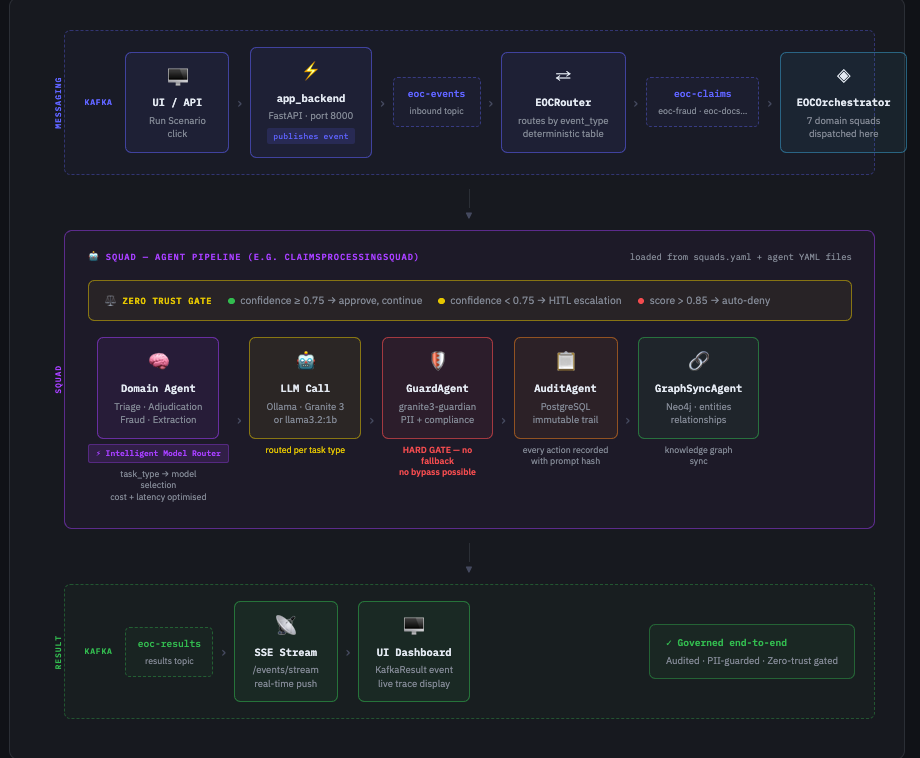
One coherent, runnable system. A real domain — insurance operations. Every framework feature working together: Kafka event routing, domain squads, intelligent model routing, zero trust execution, PII guard, immutable audit trail, Neo4j knowledge graph. Built entirely from YAML configuration, with no governance logic hardcoded in application code.
Many AI framework examples begin with focused applications — chat interfaces, summarizers, assistants, or small workflows. The EOC explores the next question serious enterprise adopters eventually ask: “What does a complete, governed, enterprise-grade K9-AIF application actually look like?”
What the EOC Demonstrates
The EOC is an insurance operations platform that processes claims, detects fraud, extracts documents, manages policies, and responds to catastrophic events — all through a governed, auditable AI pipeline.
It demonstrates every major K9-AIF capability in a single coherent system:
- Kafka-driven event pipeline — every scenario run is an event, routed by topic and event type, never by hardcoded conditionals
- 7 domain squads — Claims Processing, Risk Assessment, Document Intelligence, Customer Service, Policy Management, Audit & Compliance, Catastrophe Response
- Intelligent Model Router — selects the right model per task type (compliance gate → guardian, commodity tasks → 1b, reasoning → granite3-dense:2b)
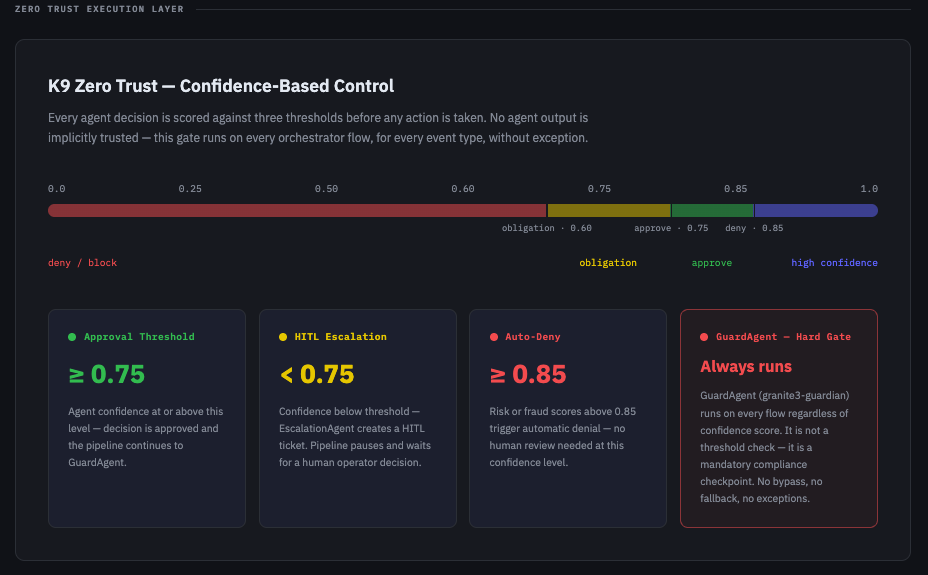
- Zero Trust Execution Layer — confidence-scored gate on every agent output, HITL escalation below threshold, auto-deny above fraud threshold
- GuardAgent — granite3-guardian runs on every flow as a hard compliance gate, no fallback, no bypass
- AuditAgent — immutable PostgreSQL audit trail with SHA-256 prompt and response hashes
- GraphSyncAgent — Neo4j knowledge graph sync for entities and relationships across every processed event
- SSE result streaming — results pushed back to the dashboard in real time via Server-Sent Events
- Iterative validation loop —
FraudDetectionAgentandDocumentExtractorAgentextendK9ValidationLoopAgent, iterating across multiple passes until confidence is sufficient before producing a result
Everything is loaded from YAML. No routing logic, model assignments, or governance rules are hardcoded in application code.
Architecture at a Glance
The full runtime architecture — including the Kafka flow, squad pipeline, model router rules, zero trust thresholds, and governance policies — is documented in the interactive blueprint below.
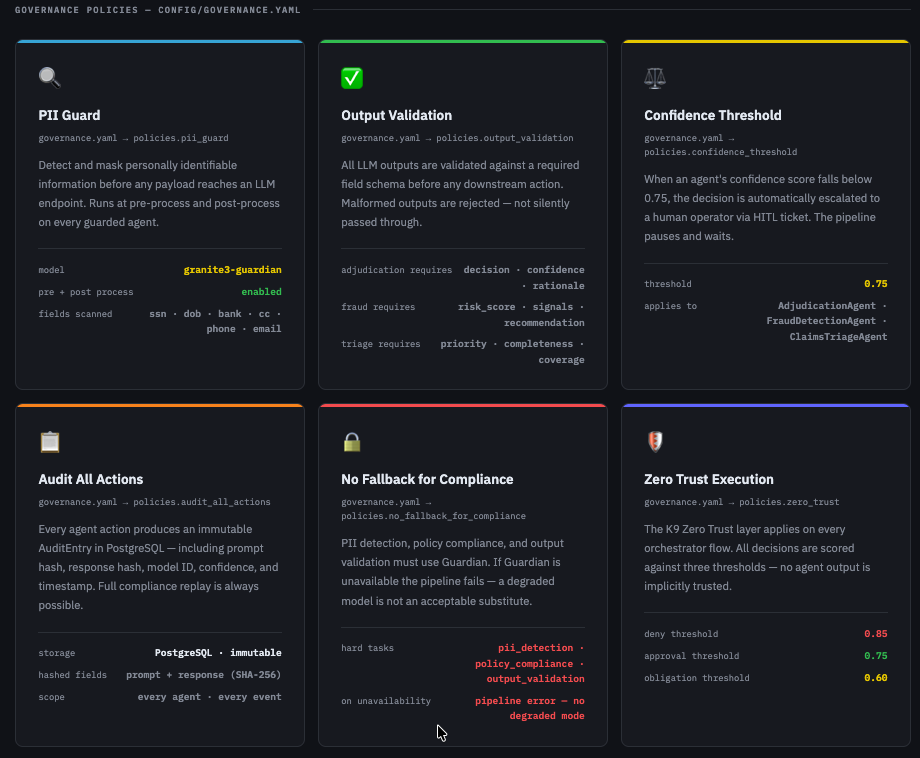
Governance Policies
Dashboard
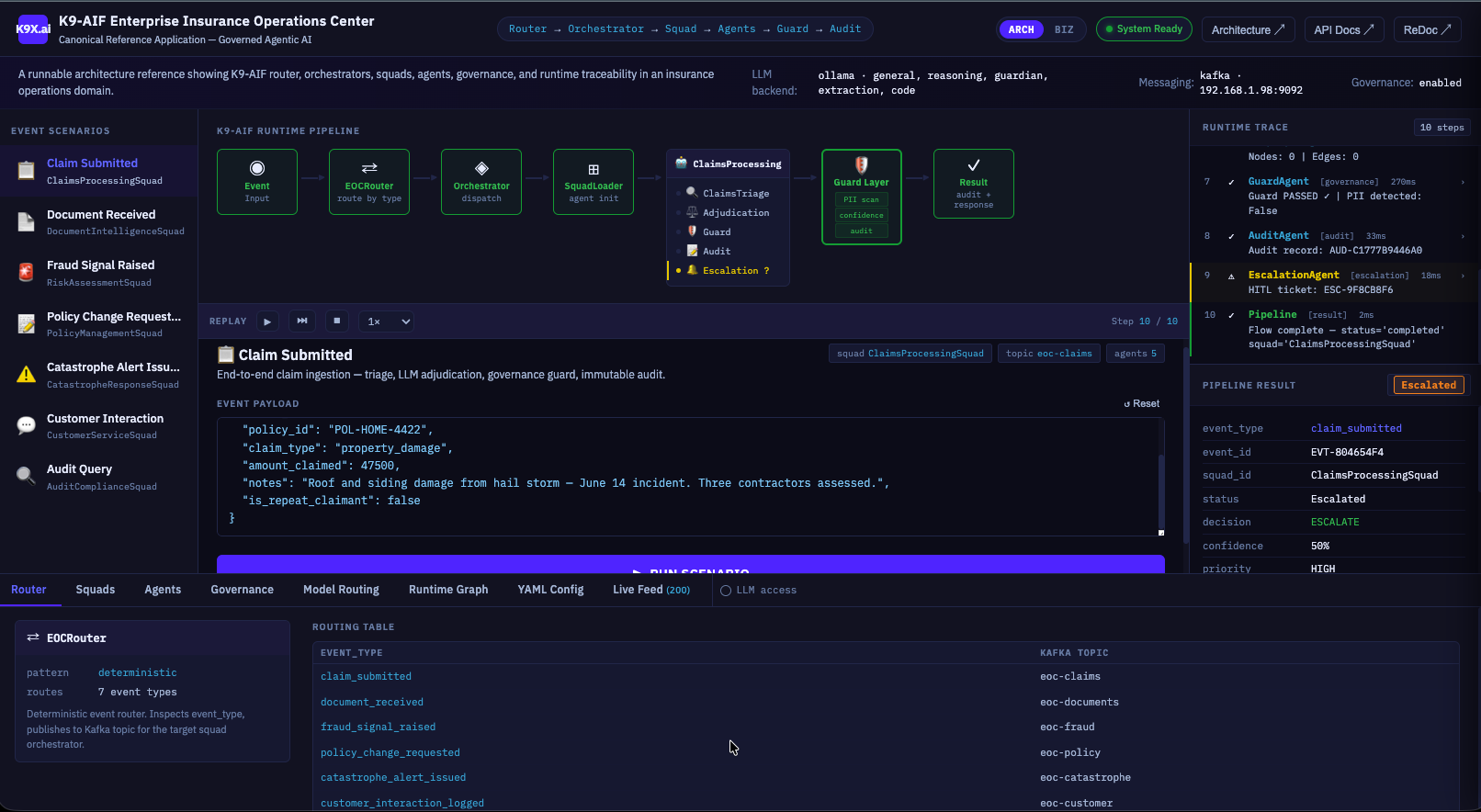
The EOC dashboard showing a Claim Submitted scenario in flight: Kafka routing → ClaimsProcessingSquad → Guard Layer → escalation. The runtime trace on the right shows each agent step with latency. Pipeline result: Escalated at 50% confidence.
The blueprint covers four sections:
- End-to-End Runtime Flow — from UI click to Kafka topic to squad pipeline to SSE result
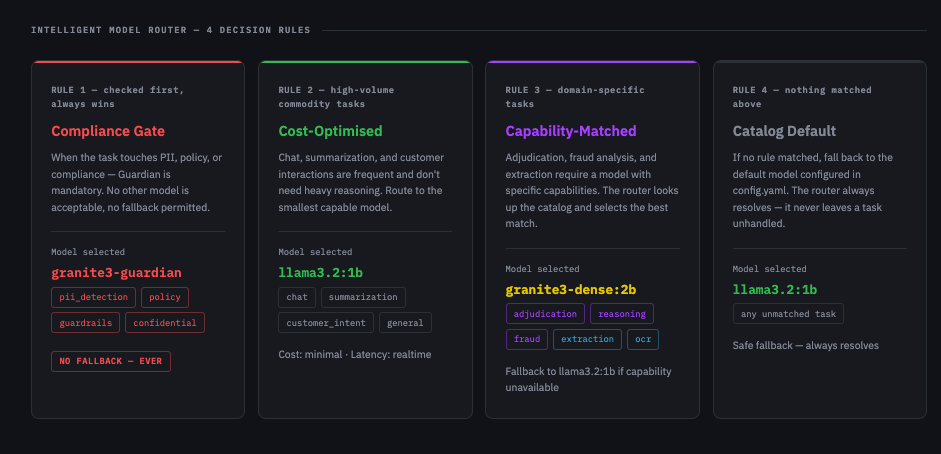
- Intelligent Model Router — the four decision rules and per-agent model assignments
- Zero Trust Execution Layer — confidence bar, approval thresholds, and the GuardAgent hard gate
- Governance Policies — all six
governance.yamlpolicies and their parameters
The Model Router in Practice
One of the more instructive things about the EOC is how the model router forces an explicit decision for every agent. There is no default “use GPT-4 for everything.” Each agent YAML declares a task_type, and the router resolves that to a model using four ordered rules:
| Priority | Rule | Model selected |
|---|---|---|
| 1st — always wins | Task touches PII / compliance | granite3-guardian — no fallback ever |
| 2nd | High-volume commodity task | llama3.2:1b — minimal cost, realtime |
| 3rd | Domain-specific capability needed | granite3-dense:2b — fallback to 1b if unavailable |
| 4th — catch-all | Nothing matched above | llama3.2:1b — always resolves |
This makes cost, latency, and compliance tradeoffs explicit in configuration — not buried in code.
Model
Zero Trust — Not a Checkbox
The EOC Zero Trust layer runs on every orchestrator flow without exception. It is not optional, and it is not just a confidence filter:
- Confidence ≥ 0.75 → approved, pipeline continues
- Confidence < 0.75 → HITL escalation, EscalationAgent creates a ticket, pipeline pauses
- Risk/fraud score ≥ 0.85 → automatic denial, no human review needed
- GuardAgent always runs — regardless of confidence score, granite3-guardian is a mandatory compliance checkpoint on every flow
The separation between the confidence threshold (which gates agent decisions) and the GuardAgent (which gates PII and compliance) is intentional. They serve different purposes and run independently.
Iterative Agents — Validation Loop in the EOC
Not every agent in the EOC produces its answer in one pass. Two agents extend K9ValidationLoopAgent — the K9-AIF OOB iterative reasoning ABB — rather than the standard one-shot BaseAgent:
FraudDetectionAgent — fraud signal correlation is not a binary decision. The first pass applies rule-based signals (keyword matching, amount thresholds, repeat claimant flags) and runs an LLM analysis. If the risk score is high enough, the loop finalizes. If not, the next iteration re-queries with the accumulated signals and prior rationale as context — each pass building a richer picture. The loop terminates on FINALIZE (high confidence fraud), FAIL (clear negative), or ESCALATE (LLM requests human review).
DocumentExtractorAgent — document extraction confidence is scored by how many required fields (document_type, claimant_name, policy_number) are successfully parsed. If the first extraction attempt misses fields, the next iteration generates a targeted prompt that calls out exactly what is missing and where to look. OCR runs once on the first pass and is cached — subsequent iterations refine the LLM prompt, not the raw text.
From the squad’s perspective, both agents are indistinguishable from any other BaseAgent — execute(payload) in, dict out. The loop is internal. The result includes an iterations field showing how many passes were needed, visible in the trace drawer on the dashboard.
Document Intelligence — MCP and Docling
Insurance documents arrive in every format: scanned PDFs, DOCX attachments, image files, fax-to-email. Before any agent can reason over a document, it needs clean, structured text. The EOC handles this through the DocumentIntelligenceSquad, and the mechanism is the K9-AIF MCP integration layer.
K9-AIF’s ABB layer includes a full Model Context Protocol (MCP) client stack — MCPHttpConnector, MCPStdioConnector, and BaseMCPAgent — so agents can call external tool servers as first-class integrations rather than ad-hoc HTTP calls. The EOC wires this to a Docling OCR MCP server running at http://192.168.1.98:5001/v1/parse. Docling does more than OCR: it converts PDFs and DOCX files to clean Markdown — preserving tables, headings, and layout — which agents can reason over directly without pre-processing.
The important detail: Docling does not just return raw text. It returns structured Markdown — the same format agents use for prompt context. This means a DOCX policy document or a multi-page PDF claim submission arrives at the LLM as clean, formatted text, not noise. The DocumentExtractorAgent then uses the extraction model to produce a validated JSON record (claimant, policy number, incident date, amount, provider) that flows into the GuardAgent compliance check and then into the Neo4j knowledge graph via GraphSyncAgent.
The ABB MCP stack means the connector type — Docling, any other OCR service, or a future multimodal model endpoint — can be swapped in configuration without touching squad or orchestrator code.
Live Demo
The EOC is running live on RHEL at eoc.k9x.ai.
It is login-protected — if you are interested in a walkthrough, reach out directly. The login guard is in place to protect the server, not the ideas. Everything you need to understand and replicate the system is in the framework repository.
Exploring the Code
The full EOC source is in the K9-AIF framework repository under:
examples/K9X_Enterprise_Insurance_OperationsCenter/
├── agents/yaml/          # agent definitions — task_type, model, governance
├── squads/yaml/          # squad composition and ordering
├── config/
│   ├── config.yaml       # model catalog and defaults
│   ├── governance.yaml   # all governance policies
│   ├── flows.yaml        # event-type to squad routing table
│   └── orchestrators.yaml
├── orchestrators/        # one orchestrator per domain
├── router/               # EOCRouter (Kafka) + EOCModelRouter
├── api/                  # FastAPI app backend
└── webui/                # dashboard, landing page, blueprint
The YAML files are the authoritative source. The Python code loads and executes them — it does not define policy.
What This Example Is For
The EOC is not a template to copy. It is a reference implementation to read.
When you are designing your own K9-AIF application and asking “how should I structure the model router for compliance tasks?” or “where does the zero trust gate plug in?” — this is the answer. A complete, working system that made all those decisions and documented the reasons in YAML.
The architecture blueprint is the best place to start.
If you want to see how an example like this is built end-to-end using Claude Code, see Building a K9-AIF Example with Claude Code.
The full EOC architecture — every squad, agent, orchestrator, and inheritance relationship — is navigable as a live knowledge graph. Open graph.k9x.ai, switch to the Examples tab, and select EOC — Enterprise Insurance Operations Center.