K9-AIF is designed so that application developers do not start from a blank page.
The framework already comes with reusable core Architectural Building Blocks (ABBs), such as base orchestrators, base agents, persistence abstractions, factories, and supporting runtime capabilities. As K9-AIF is adopted within an organization, those ABBs may be enhanced over time, but for the application developer, the starting point is already available.
The developer workflow in K9-AIF is therefore straightforward:
- Use the generator to create the application scaffold.
- Extend the generated scaffold into application-specific Solution Building Blocks (SBBs).
- Configure flows and governance behavior through YAML.
- Run, test, and refine the application without reworking the framework core.
The K9-AIF Developer Workflow
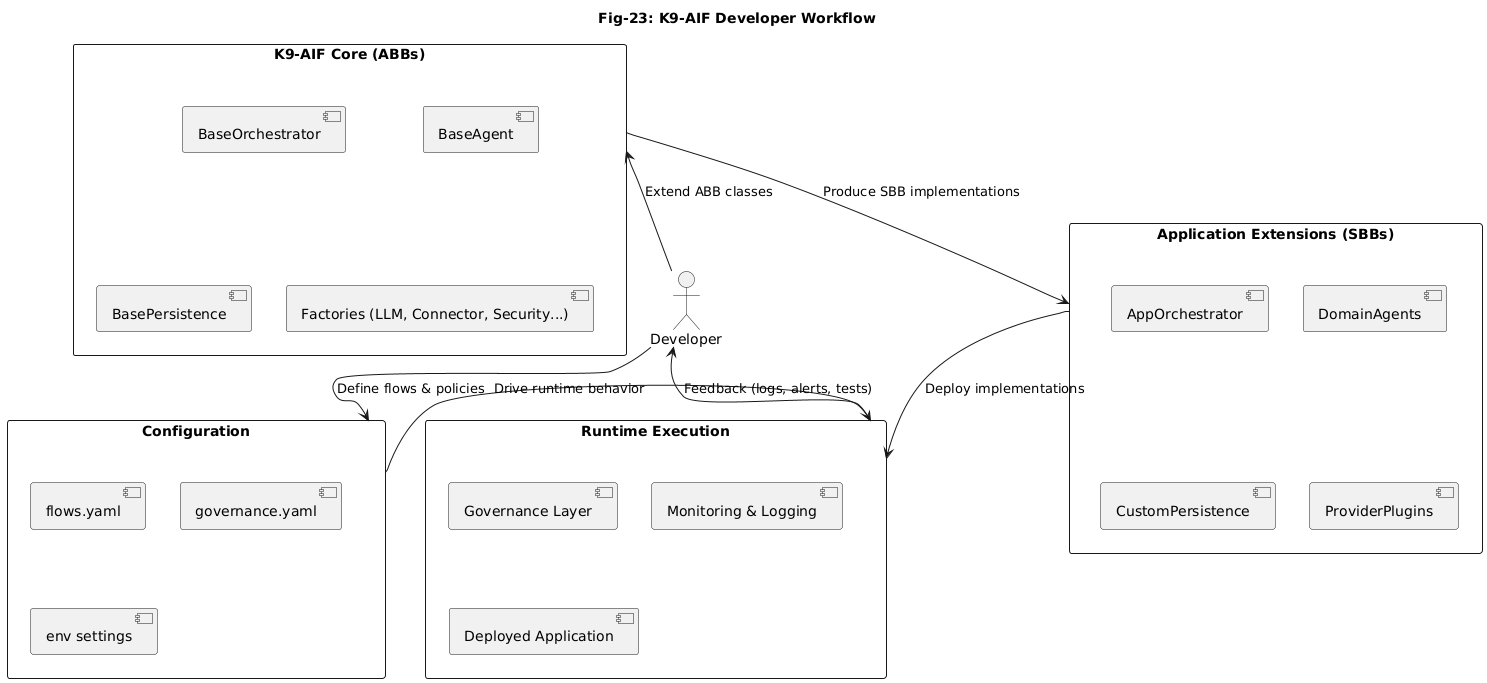
Figure: K9-AIF Developer Workflow — K9-AIF provides the reusable core, developers build Solution Building Blocks on top of it, and runtime behavior is controlled through configuration.
Start with the generator, not from scratch
A developer using K9-AIF should not be hand-building the project structure from the ground up.
The first step is to use the K9 generator to produce the initial application scaffold. That scaffold provides the starting structure for:
- orchestrators
- agents
- persistence hooks
- provider extensions
- configuration files
- runtime integration points
This gives the developer a consistent project layout aligned with K9-AIF conventions.
Instead of deciding where everything should live, the developer begins with a framework-aligned structure and focuses on implementing the application.
K9-AIF already provides the ABB foundation
In this workflow, the developer is not expected to define the core Architectural Building Blocks.
K9-AIF already comes with that foundation.
These ABBs represent the reusable platform-level structure of the framework. They define the extension points that application teams build on top of.
Examples include:
- base orchestrator classes
- base agent classes
- persistence abstractions
- factories for LLMs, connectors, security, and related services
- monitoring and governance hooks
From the developer’s point of view, these are the building blocks already supplied by the framework.
The job is not to recreate them.
The job is to use them correctly and extend them cleanly.
The developer creates the SBBs
Once the scaffold is generated, the developer creates the Solution Building Blocks (SBBs) for the application.
This is where application-specific logic is implemented.
Typical SBBs may include:
- an application orchestrator
- domain-specific agents
- custom persistence implementations
- provider-specific plugins
- integration adapters for external systems
This is the main development activity in K9-AIF.
The developer takes the framework-provided foundation and turns it into a working business solution by filling in the application layer.
That is the key mindset:
K9-AIF supplies the reusable structure.
The developer supplies the solution-specific implementation.
Configuration is part of the workflow
In K9-AIF, not every change should require code changes.
A major part of the developer workflow is understanding what belongs in code and what belongs in configuration.
Runtime behavior can be influenced through configuration such as:
flows.yamlgovernance.yaml- environment settings
These files can be used to define things such as:
- flow selection
- routing behavior
- policy controls
- governance rules
- environment-specific runtime settings
This means the developer does not need to hardcode every execution detail into the application.
Instead, the application code focuses on the SBB implementations, while configuration files control how the runtime behaves.
How a developer should think in K9-AIF
A useful way to think about the K9-AIF workflow is this:
The framework gives you the architectural skeleton.
The generator gives you the scaffold.
Your job is to implement the application-specific SBBs and wire them into the runtime model.
That makes the development path much cleaner:
- do not redesign the framework
- do not rebuild the base classes
- do not hardcode what should live in configuration
- focus on extending the scaffold into a real application
This keeps development aligned with the framework’s architecture instead of drifting into ad hoc implementation.
Why this workflow matters
This approach gives developers several practical advantages.
First, it reduces startup friction.
A team can begin from a generated scaffold instead of spending time inventing project structure.
Second, it makes extension points clearer.
Developers know where orchestration logic goes, where agent logic goes, and where runtime behavior should be configured.
Third, it improves maintainability.
Because framework concerns, application code, and configuration are separated, systems can evolve with less disruption.
Finally, it supports enterprise adoption.
As organizations mature their use of K9-AIF, they can strengthen the ABB layer while allowing teams to continue building SBBs consistently on top of it.
More than coding: building the right layer
A developer in K9-AIF is not just writing code.
The developer is building the solution layer on top of an existing architectural base.
That distinction matters.
In many AI projects, framework logic, application logic, and runtime rules get mixed together very quickly. K9-AIF avoids that by giving the developer a defined path:
- generate the scaffold
- implement the SBBs
- configure the runtime
- test and evolve the application
That is a much cleaner way to build enterprise AI systems.
Closing thought
The K9-AIF developer workflow is intentionally structured.
The framework already provides the core ABB foundation.
The generator gives the developer a consistent scaffold.
The developer then creates the application-specific SBBs and uses configuration to guide runtime behavior.
That is the model.
Do not start from scratch.
Start from the scaffold, extend the framework correctly, and build the solution in the layer where it belongs.
The K9-AIF Generator in practice
The K9-AIF developer workflow starts with the generator.
Instead of manually creating project structure, developers use the generator to bootstrap a ready-to-run application scaffold that already follows K9-AIF architecture and conventions.
From the root of the K9-AIF repository:
./k9_generator.sh preview MyApp
This shows what will be created without writing files.
To generate the application:
./k9_generator.sh run MyApp
This produces a complete scaffold including: • agents • squads • orchestrator • configuration (agents, squads, app config) • entry point (main.py) • test scaffolding
Once generated:
cd k9_projects/my_app
python main.py
At this point, the developer is no longer dealing with framework setup. The focus shifts to extending the generated scaffold into Solution Building Blocks (SBBs) and implementing real business logic.
A full walkthrough of the generator and the generated structure is available here:
https://github.com/k9aif/k9-aif-framework/blob/main/generator/Sample-Run.md
Learn More
K9-AIF is an architecture-first framework for modular and governed agentic AI systems.
More at: